Anki Cozmo · Volume 5
Three Ways to Program It
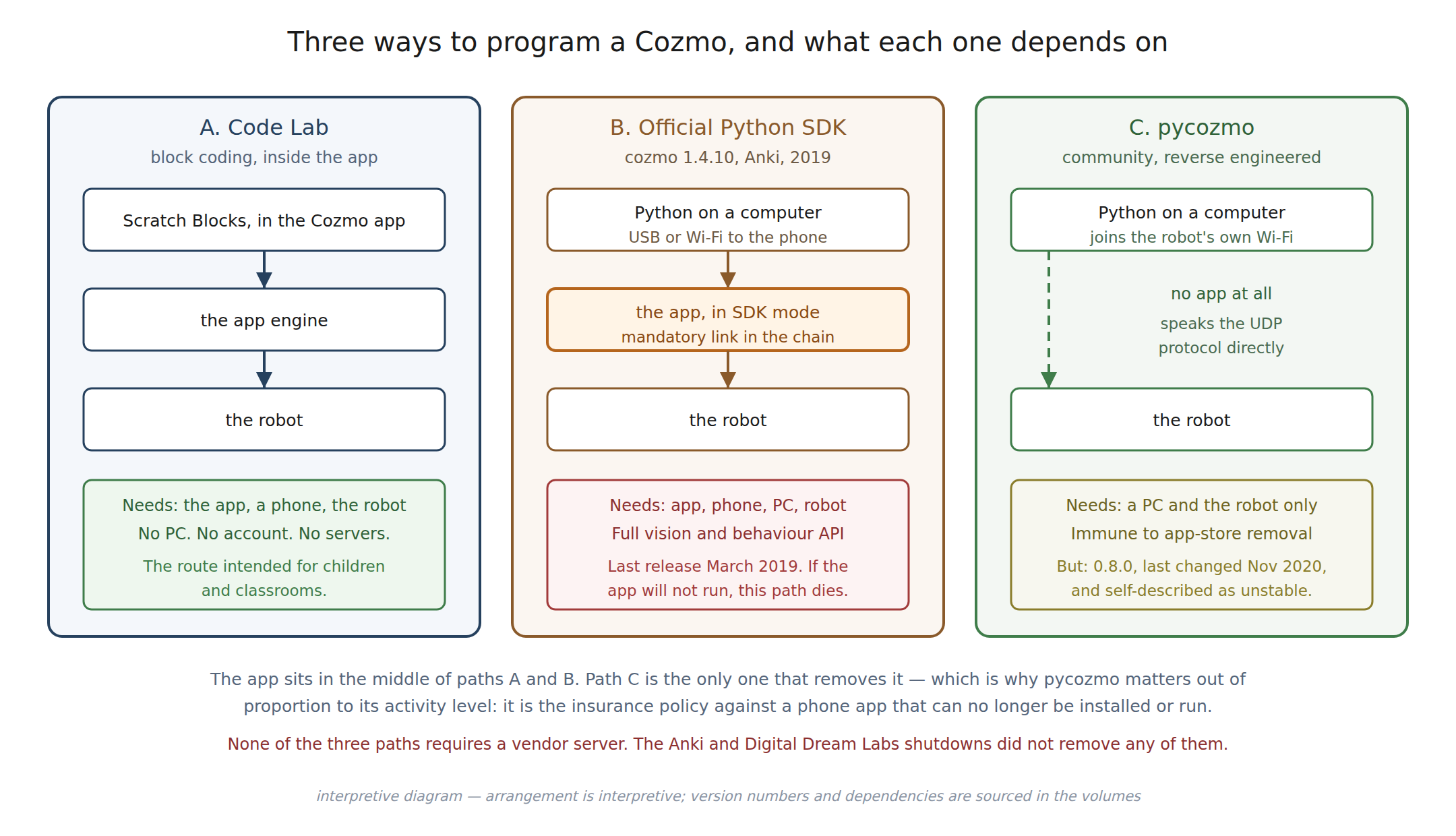
5.1 The shape of the problem
Cozmo can be programmed three ways. They differ less in what they can make the robot do than in what has to still exist for them to work — and since the vendor does not, that is the axis that matters.
5.2 Code Lab
Code Lab shipped on 26 June 2017 as a free update. It is a block-based visual programming environment built on Scratch Blocks, the collaboration between Google and the MIT Scratch Team, and Cozmo was promoted at the time as the first toy built for children on that platform. A December 2017 update added conditional statements, extending it beyond straight-line sequences.
Code Lab runs inside the Cozmo app. There is no computer, no installation, no account and no network beyond the robot’s own. A child drags blocks on a tablet and the robot performs them. Later app revisions reorganised the feature — user-created projects were reclassified as “Sandbox” projects in the 2.1.0 app — but the capability persisted.
Anki’s own support material recommended Code Lab over the Python SDK for most users, noting that Code Lab is localised into multiple languages while the SDK is English only. For classroom use that is decisive.
Code Lab’s dependency chain is the shortest possible: app, phone, robot. Its ceiling is correspondingly low — it is a teaching tool, not a robotics API.
5.3 The official Python SDK
Anki published a Python SDK under the package name cozmo. It exposes the full
capability set: camera frames, face and pet detection, object recognition, the
behaviour and animation systems, motor control, path planning and the display.
Its defining constraint is stated plainly in the setup documentation: the SDK requires the mobile app running in SDK mode. The user opens the app, taps Enable SDK, and connects the phone to a computer by USB or over the network. Python on the computer then talks through the app to the robot.
The app is therefore a mandatory link in the chain. The SDK is not an alternative to the app; it is an extension of it. Everything Vol 4 said about the app being the engine applies here — the SDK is a script driving the engine, not a replacement for it.
5.3.1 Its condition
The SDK’s state should be described accurately rather than charitably.
Table 1 — Its condition
| Attribute | Value |
|---|---|
| Package | cozmo |
| Repository | anki/cozmo-python-sdk |
| Latest release tag | 1.4.10 |
| Date of that release | 12 March 2019 |
| Last repository activity | November 2022 |
| Repository archived | No |
| Stars | approximately 725 |
Release 1.4.10 predates Anki’s shutdown by about seven weeks. In substance the SDK has not been developed since the company failed.
A version discrepancy is worth flagging. The GitHub repository’s most recent
release tag is 1.4.10, but the documentation Digital Dream Labs hosts at
cozmosdk.anki.bot is titled for version 1.4.12. This dive did not establish what
1.4.12 contains, whether it was ever published as source, or whether the version string
is simply an artefact of the documentation build. It is recorded as an unresolved
discrepancy, not silently reconciled.
The repository’s licence is not a standard identifier that GitHub recognises; the terms
are in the repository’s own LICENSE.txt and should be read directly by anyone
intending to redistribute derived work.
5.4 pycozmo
pycozmo is a third, independent path, and architecturally the most interesting
thing in this dive.
It is a pure-Python communication library and alternative SDK written by Kaloyan
Tenchov, published under the MIT licence, that speaks Cozmo’s UDP protocol
directly. It does not use the app. It does not require the app to be installed. A
computer joins the robot’s Wi-Fi network and pycozmo becomes the engine.
The connection procedure follows from Vol 4: place the robot on its charging platform,
lift the arm to reveal the pre-shared key on the robot’s own screen, join the
Cozmo_XXXXXX network, and connect.
5.4.1 What it does and does not give you
This is where honesty matters more than enthusiasm, because pycozmo’s own
documentation is careful and its summaries elsewhere frequently are not.
Well supported. Sensors — camera, cliff sensor, accelerometers, gyroscope, battery voltage for both robot and cubes, and the backpack button on hardware version 1.5 and newer. Actuators — wheel, head and lift motors, the display, the speaker, the backpack LEDs, the infrared LED, cube LEDs and platform LEDs. On-board functions — Wi-Fi access point, Bluetooth Low Energy, localisation, path tracking, non-volatile storage and over-the-air firmware update.
Work in progress. The off-board functions: procedural face generation, animations, the personality engine, behaviours, motion detection, object, face and pet detection, cube marker recognition, face recognition, expression estimation, camera calibration, navigation, text to speech and songs.
That second list is, almost exactly, the list from Vol 4 of everything that makes Cozmo
feel like Cozmo. pycozmo reimplements the robot half of the protocol thoroughly and
the engine half partially. It gives an operator complete low-level command of the
machine — drive the treads, read the camera, paint the screen — and it does not give
back the character. The project describes itself as “unstable and heavily under
development.”
Anyone expecting pycozmo to be a drop-in replacement for the app experience will be
disappointed. Anyone wanting Cozmo as a small, cheap, well-documented mobile robotics
platform with a camera will find it is exactly the right tool.
5.4.2 Its condition
Table 2 — Its condition
| Attribute | Value |
|---|---|
| Package | pycozmo |
| Repository | zayfod/pycozmo |
| Latest version | 0.8.0 |
| Released | 12 November 2020 |
| Last commit | 12 November 2020 |
| Licence | MIT |
| Python | 3.6 and newer; 3.6 to 3.9 explicitly listed |
| Stars / forks | approximately 229 / 86 |
The project has been dormant for roughly six years. Its dependencies — Pillow, FlatBuffers and dpkt — and its stated Python range both predate current interpreters, so installation on a modern system may need work.
5.5 Why the dormant project is the important one
Ranking these three by activity gives the wrong answer. Rank them by what must survive instead:
Table 3 — survive instead
| Path | Requires the app? | Requires a vendor? | Fails when |
|---|---|---|---|
| Code Lab | yes | no | the app can no longer be installed |
| Official SDK | yes | no | the app can no longer be installed |
pycozmo | no | no | nothing external — the protocol is fixed |
Two of the three paths share a single point of failure, and it is the one Vol 4 identified as Cozmo’s only real long-term dependency: a mobile application that nobody is maintaining, running on operating systems that keep moving.
pycozmo is the only path that does not have that dependency. The protocol it speaks
is burned into robots that already exist and cannot change. A dormant library against a
frozen protocol does not rot the way an app does — it needs porting to a newer Python,
which is ordinary work that any competent developer can do, rather than needing a
vendor’s cooperation, which is unobtainable.
That is why a project with 229 stars and no commits since 2020 is the most strategically significant software in this dive. It is not the best-maintained option. It is the one that cannot be taken away.
Sources
- Wikipedia, “Cozmo” — the Code Lab release date and the December 2017 conditionals update.
- Google education blog and MIT Media Lab material — Scratch Blocks as the basis for Code Lab.
- Digital Dream Labs support article, “Cozmo SDK Information” — the SDK being free, English-only, and the recommendation of Code Lab as the more approachable and localised route.
- Cozmo SDK documentation, “Initial Setup” and “Getting Started” — the SDK-mode requirement and the USB or Wi-Fi connection to the phone.
anki/cozmo-python-sdkrepository metadata — release tag 1.4.10 dated 12 March 2019, last activity November 2022, not archived, licence not a recognised identifier.cozmosdk.anki.bot— documentation titled for version 1.4.12, the source of the recorded discrepancy.zayfod/pycozmorepository and PyPI listing — version 0.8.0 of 12 November 2020, MIT licence, Python support range, dependencies, and the supported and work-in-progress feature lists quoted above.
Comments (0)