Reachy Mini · Volume 4
The Software Stack — Daemon, SDK and Simulator
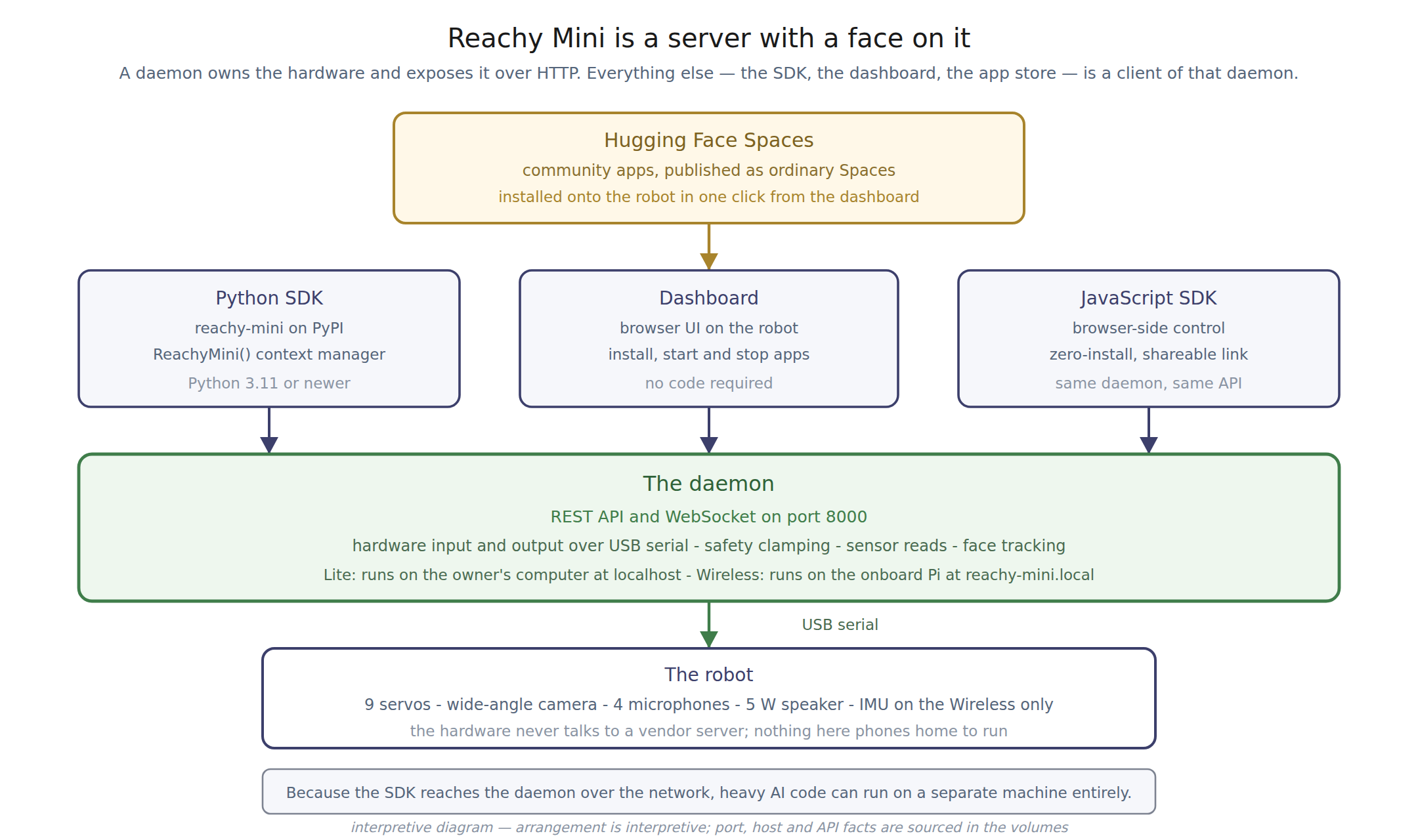
4.1 A server with a face on it
Reachy Mini’s software is built as client and server, and understanding that split explains most of what is unusual about the machine.
The daemon is the server. It owns the hardware: it drives the USB serial link to the motors, reads the sensors, enforces the safety limits from Vol 3, and runs face detection. It exposes all of this as a REST API and a WebSocket on port 8000.
The SDK is a client. The reachy_mini Python package connects to the daemon over
the network and issues requests.
Where the daemon runs is the only real difference between the variants:
Table 1 — Where the daemon runs is the only real difference between the variants
| Variant | Daemon host |
|---|---|
| Lite | localhost — on the owner’s own computer |
| Wireless | reachy-mini.local — on the onboard Raspberry Pi |
4.1.1 Why an HTTP API on a desktop toy
The design has a consequence the documentation states plainly and which is easy to underrate: the client does not have to be on the same machine as the daemon. Heavy model inference can run on a workstation with a real GPU while the daemon runs on the robot’s Compute Module, with the network in between.
That is the right architecture for a robot whose entire purpose is to be the physical front end for machine-learning models that are too large to run on a Raspberry Pi. It also means the robot is driven by an ordinary, inspectable, local HTTP interface — not a proprietary protocol, and not a vendor endpoint. Anything that can make an HTTP request can operate this robot.
Compare the Cozmo dive, where the equivalent interface is an undocumented UDP protocol on port 5551 that had to be reverse-engineered by a volunteer before anyone outside the company could use it.
4.2 The Python SDK
Table 2 — The Python SDK
| Attribute | Value |
|---|---|
| Package | reachy-mini on PyPI |
| Latest release | 1.10.0, 25 August 2026 |
| Pre-release | 1.11.0rc1, 11 September 2026 |
| Licence | Apache-2.0 |
| Maintainer | Pollen Robotics |
| Python | 3.11 or newer per PyPI; the docs recommend 3.12 |
A minor discrepancy is worth flagging: the PyPI metadata requires Python 3.11+, while the installation guide describes a supported range of 3.10 to 3.12 and recommends 3.12. Anyone on 3.10 should expect the package requirement to win.
Installation uses uv, and the simulator is an optional extra:
uv pip install "reachy-mini"
uv pip install "reachy-mini[mujoco]"
Git LFS is required to fetch model assets. Linux users need two additional steps:
GStreamer must be installed manually, and udev rules must be added for USB permissions,
covering vendor identifiers 1a86 and 38fb.
4.2.1 Moving the robot
The SDK is a context manager, and connection mode is auto-detected:
from reachy_mini import ReachyMini
from reachy_mini.utils import create_head_pose
import numpy as np

with ReachyMini() as mini:
    mini.goto_target(
        head=create_head_pose(z=10, mm=True),
        antennas=np.deg2rad([45, 45]),
        body_yaw=np.deg2rad(30),
        duration=2.0,
        method="minjerk",
    )
goto_target interpolates smoothly between poses. set_target bypasses interpolation
for high-frequency control — following a joystick, or replaying a generated trajectory.
The interpolation methods are linear, minjerk (the default), ease_in_out and
cartoon. That last one deserves a note: a named easing curve whose purpose is to
make motion read as animated rather than mechanical is a direct descendant of the
character-animation thinking that made Cozmo compelling a decade earlier. It is a
deliberate design position, expressed as an API parameter.
4.2.2 Motor modes
Table 3 — Motor modes
| Call | Behaviour |
|---|---|
enable_motors() | stiff; holds position |
disable_motors() | limp; no power |
enable_gravity_compensation() | soft — movable by hand, stays where left |
Gravity compensation requires the Placo kinematics backend. It is the mode that makes posing the robot by hand practical, and it is the same capability that Vol 5 of the Petoi dive describes as teaching by demonstration — arrived at from a completely different direction.
4.2.3 Sensing through the SDK
Camera frames come back as a numpy array of shape (height, width, 3), dtype
uint8:
with ReachyMini(media_backend="default") as mini:
    frame = mini.media.get_frame()
Face tracking runs inside the daemon, not in the application:
mini.start_head_tracking()
face = mini.get_tracked_face()   # detected, x, y in [-1, 1], roll
mini.stop_head_tracking()
start_head_tracking(weight=...) blends tracking against application motion — 1.0
gives the head entirely to the tracker, 0.0 pauses detection and frees both the head
and the CPU without tearing the tracker down. That such a specific knob exists suggests
it was added because applications needed it.
Audio is 16 kHz float32, with direction-of-arrival exposed directly:
mini.media.start_recording()
samples = mini.media.get_audio_sample()          # (samples, 2) float32
doa, is_speech = mini.media.get_DoA()            # 0 rad left, pi rad right
mini.media.push_audio_sample(samples)
push_audio_sample is non-blocking — it returns immediately while audio plays, so
an application that needs to wait must compute the duration itself.
The IMU is Wireless-only and returns accelerometer, gyroscope, quaternion and temperature.
4.2.4 Media backends
Table 4 — Media backends
| Backend | Use |
|---|---|
default | auto-selects local or WebRTC |
local | GStreamer, same machine as the daemon |
webrtc | daemon streams H.264 video and Opus audio to a remote client |
no_media | releases the camera and audio hardware for direct access |
no_media is the thoughtful one: it exists so an application can use OpenCV or
sounddevice against the hardware directly, with the daemon re-acquiring on exit.
A current limitation: the WebRTC backend requires GStreamer on the client, and only Linux is fully supported as a remote client at present, with Windows and macOS tracked as future work.
4.2.5 Recording motion
mini.start_recording()
move_the_robot_by_hand_or_by_command()
recorded = mini.stop_recording()
Combined with gravity compensation, this is how motions are authored without writing joint angles.
4.3 The simulator
The MuJoCo simulation is published alongside the SDK and installs as an extra. It matters for a reason specific to this product: the lead time is up to 90 days. An owner can write and test application code in simulation for the entire wait, and the hardware arrives as a deployment target rather than a starting point.
No other robot in this hub offers that. For Cozmo and Vector, development could not begin before the robot was on the desk.
4.4 The JavaScript SDK
A JavaScript SDK targets the same daemon and the same API. The documentation’s own framing is useful: Python for scripting, control loops and code running on the robot; JavaScript for applications meant to be shared, since a browser page requires no installation.
Sources
- huggingface.co/docs/reachy_mini, “Core Concepts & Architecture” — the client-server
split, the daemon’s responsibilities, the REST and WebSocket API on port 8000, the
localhostandreachy-mini.localhosts, the safety limits and the motor modes. - huggingface.co/docs/reachy_mini, “Python SDK” —
ReachyMini,goto_target,set_target, the interpolation methods, camera and audio access, head tracking and its weight parameter, the IMU, the media backends, motion recording, and the JavaScript comparison. - huggingface.co/docs/reachy_mini, “Installation” —
uv, the package name, the mujoco extra, Python version guidance, Git LFS, GStreamer and the udev rules. - pypi.org/project/reachy-mini — version 1.10.0 of 25 August 2026, the 1.11.0rc1 pre-release, the Apache-2.0 licence, the Python requirement and the optional extras.
github.com/pollen-robotics/reachy_mini— repository activity and the published simulation environment.
Comments (0)