Petoi Bittle Nybble · Volume 6
Programming It
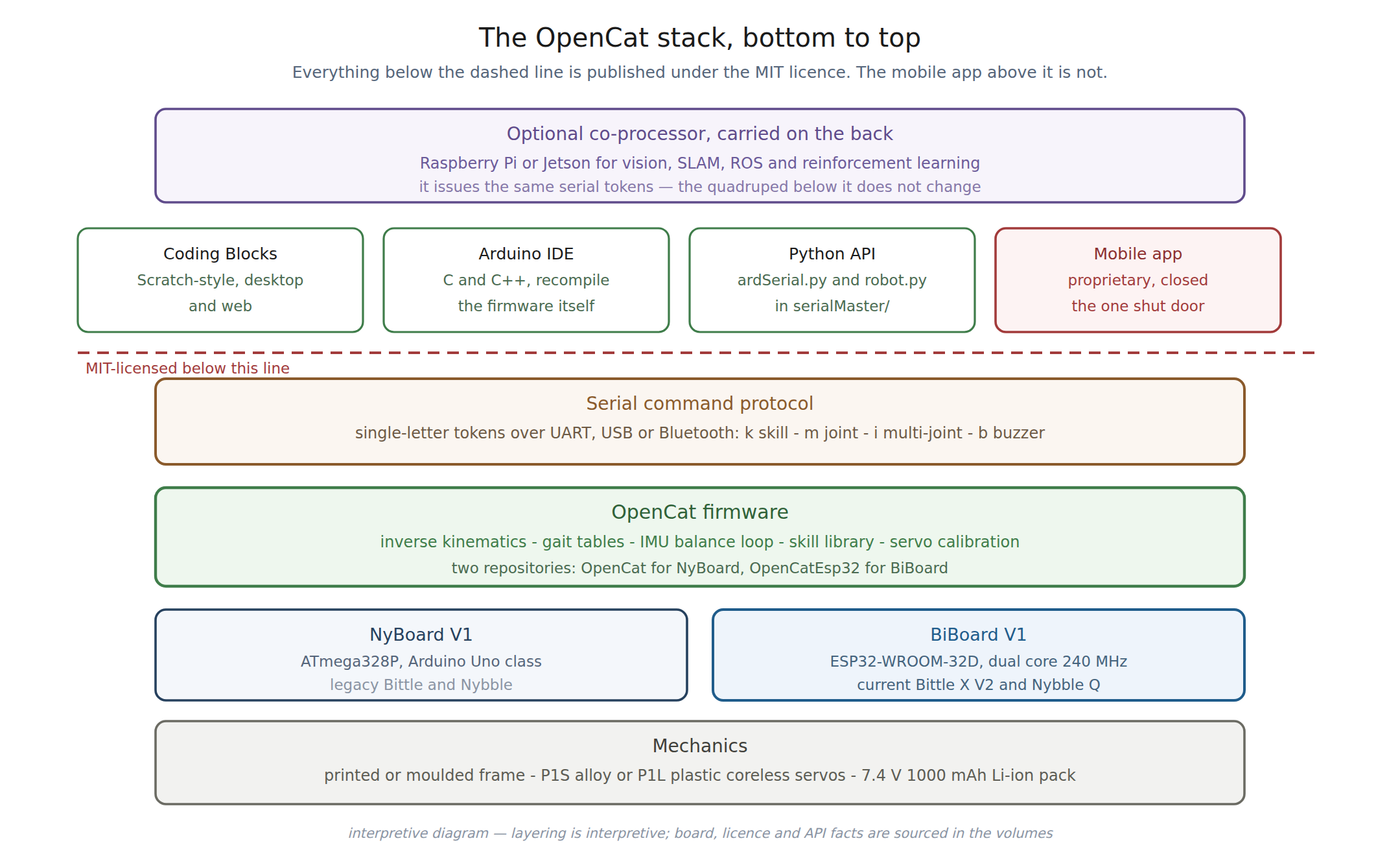
6.1 Four routes, one protocol
Every way of programming a Petoi quadruped ends up emitting the same thing: short tokens over a serial link. Block coding, C++, Python and the mobile app are four front ends onto one command protocol. Understanding that protocol is therefore worth more than learning any individual front end, and it is the reason these machines remain programmable regardless of what happens to any particular tool.
6.2 Petoi Coding Blocks
A Scratch-style block environment, published in both a desktop application and a browser-based version. Blocks are dragged into sequences and dispatched to the robot.
This is the classroom route and the one the free curricula are built around. Its ceiling is the usual one for block environments — it is a teaching surface, not an engineering one — but it reaches the whole skill library and the joint-level commands beneath it.
6.3 Arduino IDE
The firmware is C++ and it is published, so the Arduino IDE route is not “an API for the robot.” It is the robot’s actual control software, open in an editor.
An operator can read the gait tables, change them, alter the balance loop’s constants, add a skill, and reflash. Nothing is hidden behind a binary blob. For the BiBoard generation the documented upload configuration is 921600 baud, 240 MHz CPU, QIO flash mode and a 4 MB partition scheme.
This is the route that justifies calling these machines open, and it is the one with no equivalent anywhere in this hub’s Anki dives — Cozmo’s and Vector’s firmware were never published and cannot be recompiled at all.
6.4 The Python API
The Python route is the most useful for anything beyond a demonstration, and it needs a correction stated up front.
6.4.1 There is no separate Python repository
The note that scaffolded this subproject referred to a package called
OpenCatPythonAPI. No such repository exists — that path returns a 404. The Python
API ships inside the firmware repository, under serialMaster/.
That is a better arrangement than a separate package, because the API and the firmware it drives are versioned together, but anyone searching for the name in the scaffolding note will not find it.
6.4.2 Structure
Two modules do the work:
Table 1 — Two modules do the work
| Module | Role |
|---|---|
ardSerial.py | the core serial communication layer |
robot.py | a friendlier wrapper, published as PetoiRobot |
Connection is over a serial port — USB, via a CH340-class adapter, or Bluetooth. An
autoConnect() call detects and opens available ports, and supports driving more than
one robot at once.
6.4.3 The functions worth knowing
Table 2 — The functions worth knowing
| Function | Purpose |
|---|---|
autoConnect() | find and open the robot automatically |
openPort(port) / closePort() | explicit port control |
sendSkillStr(skillStr, delayTime) | invoke a named skill |
rotateJoints(token, var, delayTime) | drive joints directly |
play(token, var, delayTime) | buzzer tones |
readAnalogValue(pin) / readDigitalValue(pin) | read a pin |
writeAnalogValue(pin, val) / writeDigitalValue(pin, val) | write a pin |
That the API exposes raw pin reads and writes alongside high-level skills is a good indication of its intended audience. This is a robotics API for someone who expects to attach their own hardware.
6.4.4 A documented gotcha
The connection guidance includes a detail worth carrying forward, because it is the kind
of thing that costs an evening: if a serial command produces no response over Bluetooth,
the bluetoothPortIndex value in ardSerial.py — around line 128 — may need changing to
select a different Bluetooth serial port.
6.5 The token protocol
Beneath all four front ends is a compact command language. Tokens are single characters followed by parameters.
Table 3 — The token protocol
| Token | Meaning |
|---|---|
k | skill shortcut — ksit, kup, kbalance |
K | real-time skill data |
m / M | joint rotation, sequential; lower case ASCII, upper case binary |
i / I | joint rotation, simultaneous; lower case ASCII, upper case binary |
b | buzzer |
The case convention is the elegant part: lower case takes human-readable ASCII, upper case takes binary. The same command can be typed by hand in a terminal during debugging or emitted efficiently by a program, without two separate protocols.
Worked examples, as published:
sendSkillStr('ksit', 3)
rotateJoints('M', absValList(0, 60), 1)
play('B', [14,4,14,4,21,4,21,4,23,4,23,4,21,2], 1)
And typed directly into a serial terminal, with no library at all:
kbalance
m 0 -30 0 30
That second example — swinging the head left and right by driving joint 0 — is the whole argument for this protocol. A serial terminal and the documentation are sufficient to operate the robot. No SDK, no account, no application.
6.6 The mobile app
Petoi’s mobile app is proprietary, and it is the only closed component in the stack.
Its practical significance is limited, for the reason given in Vol 1: it is a convenience remote, not the robot’s brain. Everything it does is reachable from the other three routes, and the robot’s behaviour lives in firmware on the robot. An owner who never installs it loses a control surface and nothing else.
This is the comparison this hub keeps returning to. In the Cozmo dive, the app is the intelligence — the personality engine, the vision stack and the animation system all run there, and the robot is a peripheral without it. Here the app is a peripheral and the robot is the computer. Same word, opposite architecture, completely different consequences if the vendor disappears.
6.7 What this means for durability
Run the same test applied to the Anki machines: what has to still exist for each route to work?
Table 4 — What this means for durability
| Route | Needs vendor software? | Needs a server? | Fails when |
|---|---|---|---|
| Coding Blocks | yes, the environment | no | the environment stops running |
| Arduino IDE | no | no | never — it is C++ and a toolchain |
| Python API | no | no | never — the source is in the repository |
| Mobile app | yes, closed | no | the app stops installing |
Two of the four routes depend on nothing but a compiler and a copy of the source, both of which the owner already has under an MIT licence. That is as durable as a consumer robot gets, and it is the single strongest practical argument for these machines over anything else documented in this hub.
Sources
- docs.petoi.com, “Python API” — the
ardSerial.pyandrobot.pymodule structure, thePetoiRobotlibrary,autoConnect()and the serial and Bluetooth connection methods, the function list, the token table and the worked examples quoted above. - docs.petoi.com, “serialMaster User Guide” and the Petoi forum — the direct serial
command examples
kbalanceandm 0 -30 0 30, and thebluetoothPortIndexguidance. github.com/PetoiCamp/OpenCat,serialMaster/— the location of the Python API inside the firmware repository, and the absence of a separateOpenCatPythonAPIrepository.github.com/PetoiCamp/OpenCatEsp32-Quadruped-RobotREADME — the Arduino IDE upload settings and the web block-coding reference.- guide.petoi.com — the supported programming environments for the current generation.
Comments (0)